Waffle Designs
Hauler
A fleet management product, designed for the 3 a.m. breakdown.
- 3 fleet types
- 229 frames
- 240 components
- 155 variables
- Light + dark
- Driver app

About the project
Hauler is a complete fleet management product design for trucking, cab and corporate fleets: a desktop for the control room, a phone app for drivers, and a public tracking link for customers. It is sold as a handoff-ready Figma file that a company’s engineers build from. Above: the live map, an isometric city with route ribbons, vehicle labels and geofence zones, in night mode.
Not another dashboard
Fleet software is usually a generic admin panel with a map bolted on. But a dispatcher looks at the screen for twelve hours, a driver taps it with gloves on, and a customer only wants to know where their delivery is. Fleet companies don’t need another dashboard: they need one designed for their docks, drivers and documents.
Three fleets, one system
- Freight and logistics: long-haul and local trucking managing vehicles, trips and compliance across depots.
- Cab operators: radio-dispatch and app-based fleets that need driver apps and live tracking for customers.
- Corporate transport: employee shuttles and car pools with fixed routes, seat loads and corporate billing.
- Studios and IT teams building fleet software who want a production-ready file to start from.
Designed for the worst moment, not the demo
- One information architecture covering trucking, cabs and corporate shuttles, so the three fleet types share a system instead of three products.
- A control-room desktop where the critical things (breakdowns, delays, permits about to expire) surface first.
- A driver app of 18 phone screens with big tap targets, an offline queue and type styles for Indian scripts.
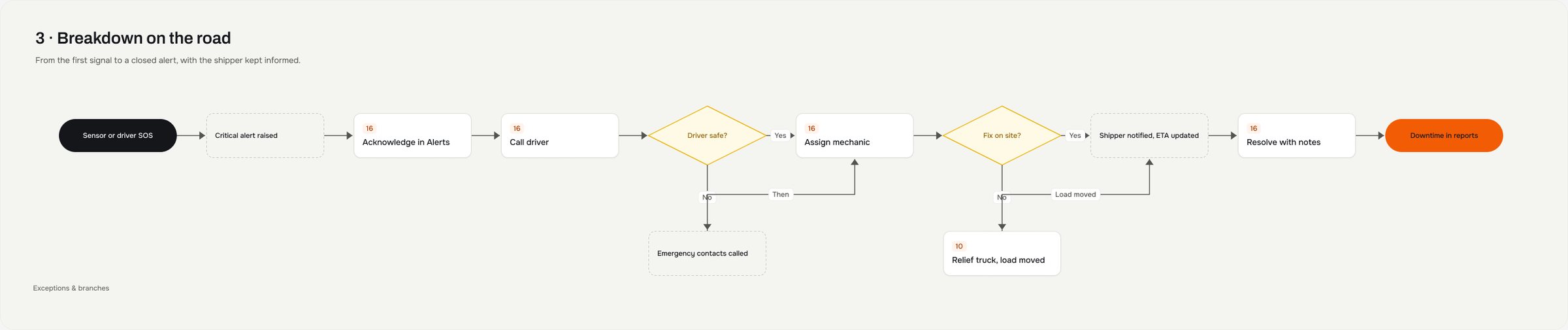
- Exceptions as first-class flows: 7 annotated flows, including trip handover, partial delivery and refused loads.
- Every state designed: empty, loading, error and edge cases for every screen.
- Built for handoff: named layers, auto layout, component specs and a token sheet, in light and dark.
Built for the cab of a truck
The driver app follows six rules, written into the file next to the screens:
- Gloves first: touch targets are at least 48 px, and primary actions are 56 px tall and full width.
- Readable in sunlight: body text is 16 px or larger, and key numbers are set large for a glance.
- No typing while moving: above 5 km/h the app hides forms and keeps only navigation, call and SOS.
- Offline by default: everything works without signal and queues updates to send later.
- Short, translatable copy, with type that supports Indian scripts.
- No pocket SOS: the emergency button needs a 2-second hold.
The unhappy paths, designed first
Seven annotated user flows map each journey end to end, from first sign-in to a corporate seat being billed. Every flow has an exception lane underneath it, so the branches (a driver who isn’t safe, a repair that can’t be done on site, a refused load) are designed with the same care as the main path.
A separate page covers 22 states: empty, loading, no permission, session expired, GPS signal lost, offline, failed uploads and more. Risky actions are slowed down on purpose. To assign a vehicle whose insurance has expired, a manager has to write a reason, which goes to the audit log, and the trip is tagged “Override” everywhere it appears.
What Hauler is designed to move
Hauler hasn’t been used by a real fleet yet, so there are no results to report. These are the metrics it was designed around, and how a fleet adopting it would know it’s working.
The share of breakdowns, delays and refused loads resolved within the fleet’s agreed time. Every screen either helps spot an exception sooner or close it faster.
How fast a dispatcher notices a breakdown on the control-room screen. Design target: under 3 seconds.
Clicks from alert to action: call the driver, reassign the load, notify the customer.
Trips started, handed over and closed in the app without calling the control room, including offline.
Customer calls asking for an update, which the public tracking link should reduce.
False or ignored alerts, and app interactions while the vehicle is moving. These must not rise.
These are design targets and the measures to validate them with real dispatchers and drivers, not results.
A product, not just a project
Hauler is offered to fleet companies three ways: a commercial licence for the file, a licence with their own brand applied, or a product partnership where Waffle Designs designs the screens Hauler doesn’t cover yet. Every package is quoted on fleet size and scope.
To be clear about what it is: Hauler is a Figma design file with specs, not working software. The 3D map is an illustration, not live data. It hasn’t been tested with real users yet, and every name and number in the screens is an illustrative example.
Screens and details